Resolve git am Merge Conflicts
TL;DR: After git am encounters a merge conflict, the output of git status and the working tree’s state do not show any sign of conflict like a
git pull, git merge, or git rebase conflict does, which can be very
confusing. To get an experience that is at least somewhat similar to those
other Git commands, use git am --reject.
Problem
When git am is used to apply patches and encounters a merge conflict, it will
print a message like this:
Applying: hello, world and foobar
error: patch failed: hello.txt:1
error: hello.txt: patch does not apply
Patch failed at 0001 hello, world and foobar
hint: Use 'git am --show-current-patch=diff' to see the failed patch
hint: When you have resolved this problem, run "git am --continue".
hint: If you prefer to skip this patch, run "git am --skip" instead.
hint: To restore the original branch and stop patching, run "git am --abort".
hint: Disable this message with "git config set advice.mergeConflict false"
Perhaps most Git users have encountered merge conflicts with git pull,
git merge, git rebase, and so on. With these Git commands, the user can
run git status to see the names of the conflicting files.
With git am, however, git status does not print any filenames or any other
useful information about the conflict, which is not very helpful:
On branch master
You are in the middle of an am session.
  (fix conflicts and then run "git am --continue")
  (use "git am --skip" to skip this patch)
  (use "git am --abort" to restore the original branch)

nothing to commit, working tree clean
When users open the conflicting files (by finding them on their own), they will
not find any conflict markers, i.e.,<<<<<<<, =======, and >>>>>>>.
Instead, they will see the files clean in their pre-merge states. After all,
the git status output says “working tree clean” too.
Example
Suppose there is a Git repository with two commits, as demonstrated by the
patch below. The first commit (f0c7480) creates a file hello.txt with
one line of text hello and another file foobar.txt with text foo. The
second commit (882b2a9) adds a line git below that line in hello.txt.
From f0c74802506c4b0a2f1e2dc5dd12755c21f1d4ef Mon Sep 17 00:00:00 2001
From: Git User <git-user@localhost>
Date: Fri, 14 Aug 2026 15:24:53 -0400
Subject: [PATCH 1/2] Initial commit

---
 foobar.txt | 1 +
 hello.txt  | 1 +
 2 files changed, 2 insertions(+)
 create mode 100644 foobar.txt
 create mode 100644 hello.txt

diff --git a/foobar.txt b/foobar.txt
new file mode 100644
index 0000000..257cc56
--- /dev/null
+++ b/foobar.txt
@@ -0,0 +1 @@
+foo
diff --git a/hello.txt b/hello.txt
new file mode 100644
index 0000000..ce01362
--- /dev/null
+++ b/hello.txt
@@ -0,0 +1 @@
+hello
--
2.55.0


From 882b2a92a9c74f0cfeedbd0191cd5fa9a2ff1db4 Mon Sep 17 00:00:00 2001
From: Git User <git-user@localhost>
Date: Fri, 14 Aug 2026 15:25:16 -0400
Subject: [PATCH 2/2] hello, git

---
 hello.txt | 1 +
 1 file changed, 1 insertion(+)

diff --git a/hello.txt b/hello.txt
index ce01362..23509e0 100644
--- a/hello.txt
+++ b/hello.txt
@@ -1 +1,2 @@
 hello
+git
--
2.55.0
Readers may follow this example by creating the same repository setup with these commands:
$ git init test
$ cd test
$ curl https://leo3418.github.io/res/posts/2026-09-06-resolve-git-am-conflicts/example-repo.patch | git am
Now, the following patch is to be applied. It contains a commit whose parent
is the repository’s first commit (f0c7480). It adds a line world below
hello in hello.txt, and bar below foo in foobar.txt. The change to
hello.txt leads to a conflict with the second commit already checked into the
repository (882b2a9) because both commits modify the same position in the
file in different ways.
From 769c4207dbdfa90bb5e05951b8c776e71b90451c Mon Sep 17 00:00:00 2001
From: Git User <git-user@localhost>
Date: Fri, 14 Aug 2026 15:25:54 -0400
Subject: [PATCH] hello, world and foobar

---
 foobar.txt | 1 +
 hello.txt  | 1 +
 2 files changed, 2 insertions(+)

diff --git a/foobar.txt b/foobar.txt
index 257cc56..3bd1f0e 100644
--- a/foobar.txt
+++ b/foobar.txt
@@ -1 +1,2 @@
 foo
+bar
diff --git a/hello.txt b/hello.txt
index ce01362..94954ab 100644
--- a/hello.txt
+++ b/hello.txt
@@ -1 +1,2 @@
 hello
+world
--
2.55.0
Readers may run this command in the repository to reproduce the conflict:
$ curl https://leo3418.github.io/res/posts/2026-09-06-resolve-git-am-conflicts/incoming.patch | git am
After witnessing it, readers can restore to the previous repository state:
$ git am --abort
Solution
When using git am to apply patches, add the --reject option to the command,
such as:
$ curl https://leo3418.github.io/res/posts/2026-09-06-resolve-git-am-conflicts/incoming.patch | git am --reject
This lets git am still apply those changes from the patch that can be applied
without a conflict, making the behavior of git am the same as that of git pull, git merge, git rebase, etc in this aspect. Conflicting changes will
be saved to *.rej files, unlike those other commands.
With git am --reject, git status will show applied changes as “Changes not
staged for commit” and list the *.rej files as untracked files. With the
above example, the change to foobar.txt in the commit 769c420 in the patch
can be applied because no other commits make a change at the same place, so it
shows up as a change not staged for commit. hello.txt.rej file will be
produced because of the merge conflict.
On branch master
You are in the middle of an am session.
  (fix conflicts and then run "git am --continue")
  (use "git am --skip" to skip this patch)
  (use "git am --abort" to restore the original branch)

Changes not staged for commit:
  (use "git add <file>..." to update what will be committed)
  (use "git restore <file>..." to discard changes in working directory)
	modified:   foobar.txt

Untracked files:
  (use "git add <file>..." to include in what will be committed)
	hello.txt.rej

no changes added to commit (use "git add" and/or "git commit -a")
Now, to resolve the conflict:
- Manually edit the conflicting files to apply the patch’s changes.
- Delete the
*.rejfiles. - Use
git add <file>...to mark resolution. - Run
git am --continueto continue.
This experience is similar to the typical conflict resolution experience with
git pull, git merge, git rebase and so on, except that the users find the
conflicting changes in *.rej files instead of in the files being changed
themselves, and they should remove the *.rej files manually after resolving
the conflicts.
Extras
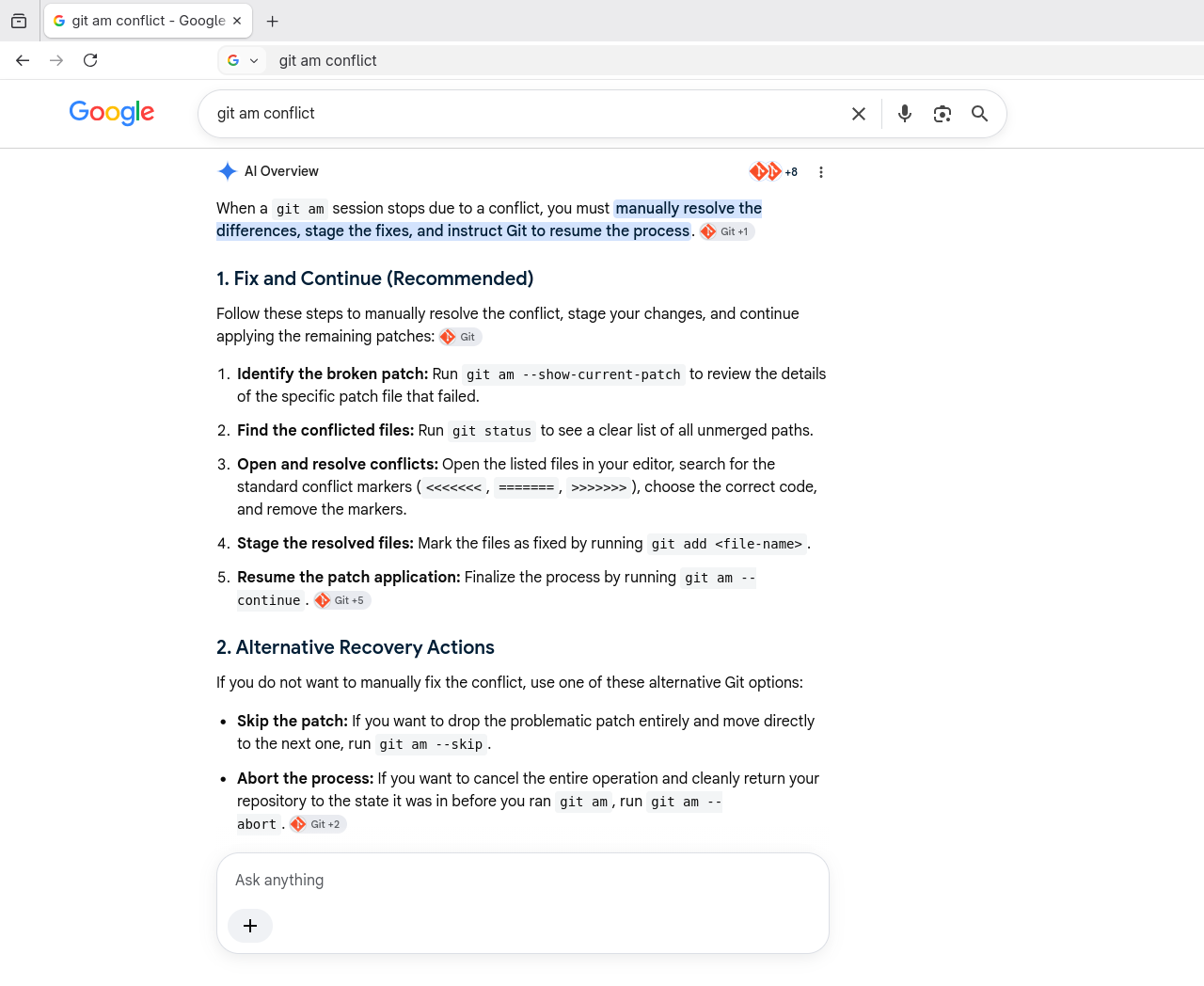
Look at how Google Search’s AI Overview could get this very wrong… The truth
is, with git am, the conflict markers will not be in the conflicting files at
all.