解决 git am 合并冲突
太长不想看? git am 遇到合并冲突时,不会像 git pull、git merge、以及 git rebase 那样在文件中留下冲突标记,git status 也不会提供任何关于冲突的具体信息,导致用户搞不清楚情况。使用 git am --reject,即可让解决 git am 冲突的用户体验与其它 Git 命令相似。
问题
使用 git am 应用补丁时,如果产生了合并冲突,就会出现以下信息:
应用:hello, world and foobar
错误:打补丁失败:hello.txt:1
错误:hello.txt:补丁未应用
打补丁失败于 0001 hello, world and foobar
提示: 用 'git am --show-current-patch=diff' 命令查看失败的补丁
提示: 当您解决这一问题之后,执行 "git am --continue"。
提示: 如果您想要跳过这一补丁,则执行 "git am --skip"。
提示: 若要复原至原始分支并停止补丁操作,执行 "git am --abort"。
提示: Disable this message with "git config set advice.mergeConflict false"
绝大多数 Git 用户应该都经历过运行 git pull、git merge、以及 git rebase 等命令期间出现的合并冲突。这些 Git 命令遇到冲突时,用户可以运行 git status 查看是哪些文件导致的冲突。
然而,git am 遇到冲突时,git status 不会提供任何与冲突相关的信息,对解决冲突毫无帮助:
位于分支 master
您正处于 am 操作过程中。
  (解决冲突,然后运行 "git am --continue")
  (使用 "git am --skip" 跳过此补丁)
  (使用 "git am --abort" 恢复原有分支)

无文件要提交,工作区干净
用户如果能自行找出并打开冲突涉及的文件,就会发现文件当中也没有任何冲突标记(即 <<<<<<<、=======、及 >>>>>>>),并且文件的内容和合并之前没有任何区别。毕竟 git status 的输出也表明“工作区干净”。
示例
假设有一 Git 仓库,其中有两次提交,如下面的补丁所示。第一次提交(f0c7480)创建了两个文件:hello.txt,内容为单行字符串 hello,以及 foobar.txt,内容为 foo。第二次提交(882b2a9)在 hello.txt 中的已有内容后面添加了一行字符串 git。
From f0c74802506c4b0a2f1e2dc5dd12755c21f1d4ef Mon Sep 17 00:00:00 2001
From: Git User <git-user@localhost>
Date: Fri, 14 Aug 2026 15:24:53 -0400
Subject: [PATCH 1/2] Initial commit

---
 foobar.txt | 1 +
 hello.txt  | 1 +
 2 files changed, 2 insertions(+)
 create mode 100644 foobar.txt
 create mode 100644 hello.txt

diff --git a/foobar.txt b/foobar.txt
new file mode 100644
index 0000000..257cc56
--- /dev/null
+++ b/foobar.txt
@@ -0,0 +1 @@
+foo
diff --git a/hello.txt b/hello.txt
new file mode 100644
index 0000000..ce01362
--- /dev/null
+++ b/hello.txt
@@ -0,0 +1 @@
+hello
--
2.55.0


From 882b2a92a9c74f0cfeedbd0191cd5fa9a2ff1db4 Mon Sep 17 00:00:00 2001
From: Git User <git-user@localhost>
Date: Fri, 14 Aug 2026 15:25:16 -0400
Subject: [PATCH 2/2] hello, git

---
 hello.txt | 1 +
 1 file changed, 1 insertion(+)

diff --git a/hello.txt b/hello.txt
index ce01362..23509e0 100644
--- a/hello.txt
+++ b/hello.txt
@@ -1 +1,2 @@
 hello
+git
--
2.55.0
读者如果想亲自尝试此示例,可运行以下命令创建同样的仓库:
$ git init test
$ cd test
$ curl https://leo3418.github.io/res/posts/2026-09-06-resolve-git-am-conflicts/example-repo.patch | git am
此时,在该仓库中应用以下补丁。该补丁中有一次提交,其父提交是仓库中的第一次提交(f0c7480)。此提交在 hello.txt 中的已有 hello 一行下添加一行字符串 world,并在 foobar.txt 中的 foo 下添加 bar。此提交对 hello.txt 的修改与仓库中已有的第二次提交(882b2a9) 冲突,因为两次提交都修改了同一文件的同一位置。
From 769c4207dbdfa90bb5e05951b8c776e71b90451c Mon Sep 17 00:00:00 2001
From: Git User <git-user@localhost>
Date: Fri, 14 Aug 2026 15:25:54 -0400
Subject: [PATCH] hello, world and foobar

---
 foobar.txt | 1 +
 hello.txt  | 1 +
 2 files changed, 2 insertions(+)

diff --git a/foobar.txt b/foobar.txt
index 257cc56..3bd1f0e 100644
--- a/foobar.txt
+++ b/foobar.txt
@@ -1 +1,2 @@
 foo
+bar
diff --git a/hello.txt b/hello.txt
index ce01362..94954ab 100644
--- a/hello.txt
+++ b/hello.txt
@@ -1 +1,2 @@
 hello
+world
--
2.55.0
读者可在仓库中运行以下命令来复现该冲突:
$ curl https://leo3418.github.io/res/posts/2026-09-06-resolve-git-am-conflicts/incoming.patch | git am
复现冲突后,运行以下命令即可将仓库恢复至之前的状态:
$ git am --abort
解决方法
在运行 git am 应用补丁时,向命令行中添加 --reject 选项,例如:
$ curl https://leo3418.github.io/res/posts/2026-09-06-resolve-git-am-conflicts/incoming.patch | git am --reject
该选项会让 git am 在遇到冲突时,依然应用补丁中其它的不冲突的修改,从而让 git am 以与 git pull、git merge、以及 git rebase 等命令相同的方式处理不冲突的修改。与其它命令不同的是,git am 会将冲突的修改保存到 *.rej 文件中。
在使用 git am --reject 时,git status 会将成功应用的修改列为“尚未暂存以备提交的变更”,并将 *.rej 文件列为未跟踪的文件。在以上示例中,补丁里的提交 769c420 中对 foobar.txt 的修改可以顺利应用,因为没有其它提交修改同一文件的同一位置,故 foobar.txt 的修改被列为尚未暂存以备提交的变更。而 hello.txt.rej 则因合并冲突而出现。
位于分支 master
您正处于 am 操作过程中。
  (解决冲突,然后运行 "git am --continue")
  (使用 "git am --skip" 跳过此补丁)
  (使用 "git am --abort" 恢复原有分支)

尚未暂存以备提交的变更:
  (使用 "git add <文件>..." 更新要提交的内容)
  (使用 "git restore <文件>..." 丢弃工作区的改动)
	修改:     foobar.txt

未跟踪的文件:
  (使用 "git add <文件>..." 以包含要提交的内容)
	hello.txt.rej

修改尚未加入提交(使用 "git add" 和/或 "git commit -a")
若要解决冲突:
- 手动修改存在冲突的文件,以应用补丁中的修改。
- 删除
*.rej文件。 - 使用
git add <文件>...标记解决方案。 - 运行
git am --continue以继续。
这样的用户体验就和解决 git pull、git merge、以及 git rebase 等命令产生的冲突的体验类似了,仅有的区别是用户需要在 *.rej 文件中查看冲突的具体内容,而非存在冲突的文件本身,并且用户需要在解决冲突后手动删除 *.rej 文件。
其它
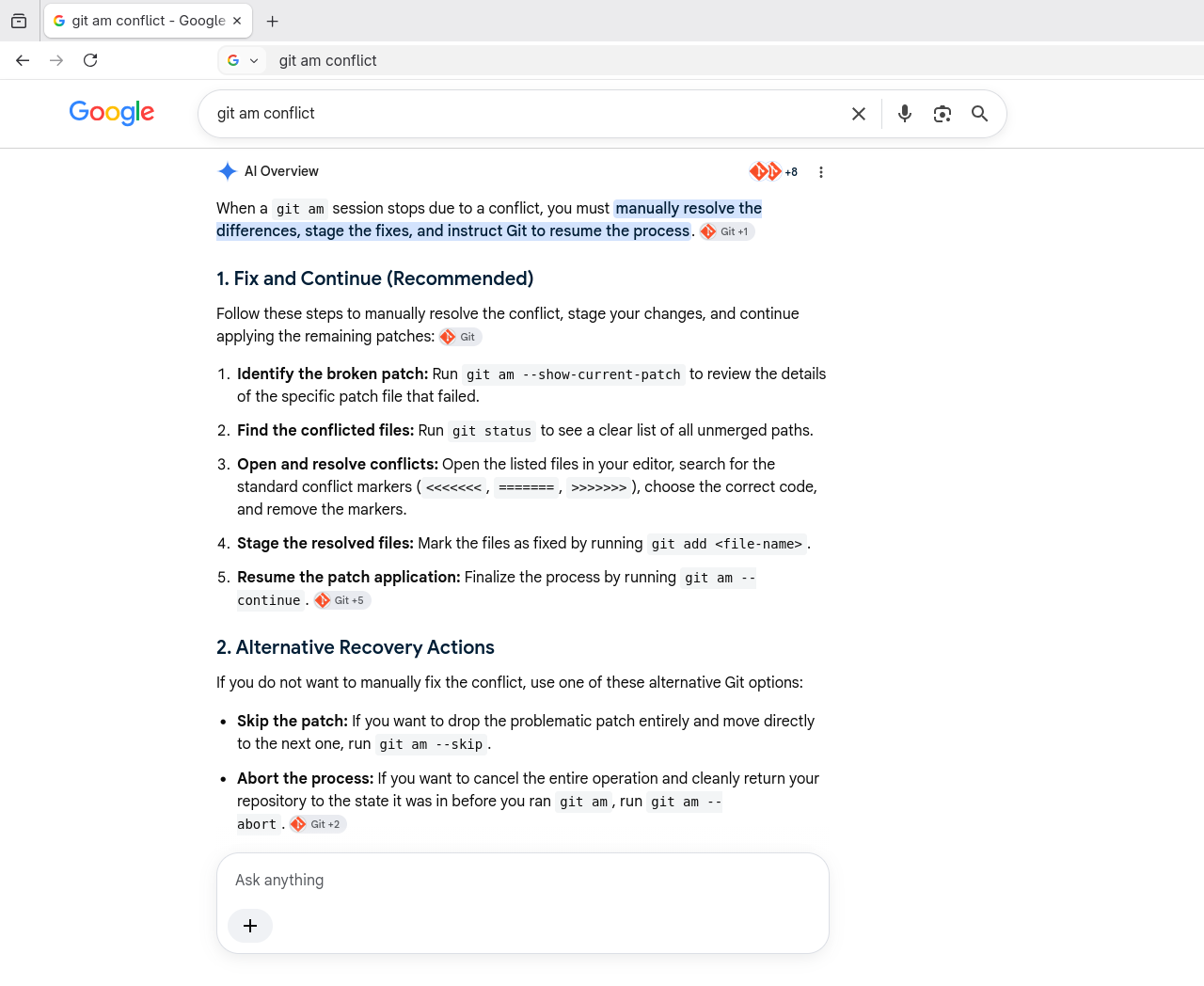
来见识一下谷歌搜索的 AI 概览能怎么胡扯……事实是,git am 根本不会向存在冲突的文件中添加冲突标记。